 English
  Arabic
 Belarusian
 Bengali
 Bosnian
 Bulgarian
 Chinese
 Croatian
 Czech
Czech Danish
 Dutch
Dutch Filipino
 Finnish
 French
 German
 Greek
Greek Hungarian
 Indonesian
 Italian
 Japanese
 Korean
 Norwegian
 Persian
 Polish
 Portuguese
 Romanian
 Russian
 Spanish
 Swedish
 Thai
Thai Turkish
 Vietnamese


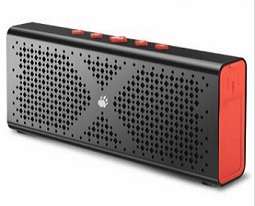
BlitzWolf™ F1 Bluetooth 4.0 Wireless 1800mah Aux-inBlitzWolf F1 is a stereo wireless bluetooth v4.0 speaker. Comes with 1800mAh powerful battery you can enjoy a long music playback. Slim body shape and experiencing rich sound for the on-the-go and outdoor use.
Features:
1.Version 4.0 Bluetooth
2.Stereo Hi-Fi with two 5 Watt speakers delivering a rich and dynamic sound experience
3.IPX-5 Exquisite aluminium alloy casing with waterproof design: water resistant, splash-proof, shock-proof,
dust-proof, can be used in harsh environments such as outdoors and shower
4.Enjoy 10-12 hours of non-stop music with our built-in 1800mAh Lithium battery
5.Universal compatibility with Android, iPhone and other Bluetooth-enabled media devices with AUX port.
6.Built-in Mic and Bluetooth hands-free capability
7.Auto sleep energy saving function.
| Brand | BlitzWolf™ |
| Model | F1 |
| Channel | 2.0 |
| Bluetooth module | Actions |
| Bluetooth version | 4.0 |
| Interface | Micro USB port,AUX in Jack |
| Accessories | USB charging cable, user manual. audio cable |
| Speaker | ?45mm; 2CH x 4?x5W |
| RMS | 4Watts*2CH |
| Bluetooth Distance: | 10M(±2M) |
| Sensitivity | 80db |
| S/N | ?60db |
| Frequency response | 100Hz-20KHz |
| Distortion | ?0.4% @1W |
| Working voltage | 3.7V-4.2V |
| Working current | ?400mA |
| battery | 1800mAH |
| Charging time | 4-5 hours |
| Playback time | About 10-12hours |
| Size | L162*W62.6*H28.6 mm |
| Package included | 1 * BlitzWolf™ F1 speaker |
| 1 * micro usb charger cable | |
| 1 * 3.5mm Audio Cable | |
| 1 * wrist strap | |
| 1 * Manual |
Kindly reminder:
Please make sure that charge the speaker at your first using.
FAQ & Solution:
1.The speaker is not connecting to my device. How can I fix this?
(a)Ensure your device’s Bluetooth function is enabled.
(b)Make sure your device is within 3ft/1m of the speaker.
(c)Delete the pairing record on the speaker or your device.
(d)Restart your Bluetooth speaker.
2.Can I use the speaker to play music while charging?
It’s best to charge to speaker while it’s off,especially when the battery is low, in order to protect the long-term performance of the battery
3.How to recharge the speaker?
When the speaker’s battery is low the power indicator will flash red light
1).Plug the micro USB cable into the input port of the speaker.
2).Insert the other end of the USB power cable into either;
(a) a computer USB port or;
(b) a USB AC adapter (not included) connected to a wall socket.
A steady red light indicates that the speaker is charging.The red light will go off when the speaker is fully charged.
An 18-MonthWarranty:
We believe in our products, join BlitzWolf to get what you want. We back them all with an 18-month warranty and provide
friendly, convenient support.

Leave a Comment